


Real Percussion: drum set
4.4267.00 Reviews
App Specs
- Version
- 6.51.1
- Updated On
- License
- Free
- Downloads
- 5,000,000+
- Developer
- Kolb Apps
- Categories
- Music
- Platform
- Android, iOS
Screenshots
 Analysis by AppCompare
When I want to try out a rhythm without pulling out an instrument or disturbing everyone around me, a touch-screen drum app is an easy place to start. Real Percussion: drum set is built around that simple idea: tap a virtual kit, explore percussion, and use lessons to get a feel for playing. It is a free music game from Kolb Apps, and its appeal is clearest when I treat it as a pocket-sized practice and play space rather than a substitute for a full drum kit.
What the current version is good for
The game has been available since December 2013 and is now at version 6.50.12. That long span gives it the feel of an established, focused instrument app rather than a new music experiment. It has a 4.6 average from around 23,000 ratings and more than five million installs, which suggests many people use it as a casual way to explore drumming. I would not read those figures as proof that every device responds identically, though: touch-screen size and performance can make a noticeable difference to the playing experience.
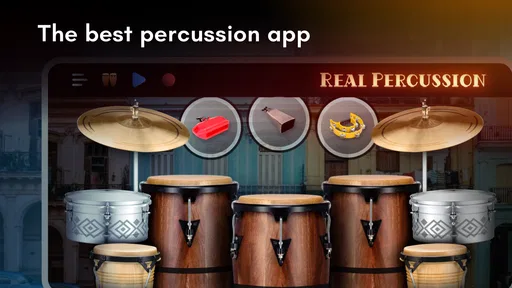
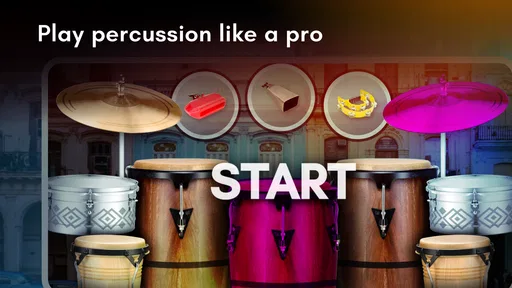
Its central strength is immediacy. I can open a kit and make a beat without first learning a complicated interface or setting up audio equipment. The on-screen arrangement gives me familiar percussion targets—such as a snare, bass drum, toms, and cymbals—so it is easy to start experimenting. That makes it useful for a short break, a first introduction to drum-kit parts, or a quick way to test a rhythm idea before I forget it.
How the playing and lessons fit together
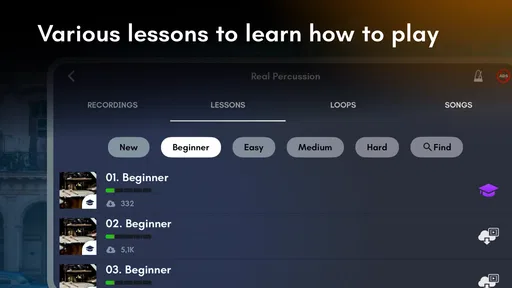
The touch controls suit short bursts of playing. I can tap out a basic pulse, add a cymbal accent, and try a fill, all without needing a physical kit. Lessons give beginners a more directed route than simply hitting every on-screen piece at random. I find that combination valuable: free play makes the app feel playful, while guided practice can give a new user something specific to work on.
There is a practical limit to what tapping can teach. A phone or tablet does not give the same rebound, spacing, foot control, or physical feedback as drumsticks and pedals. I would use the lessons to become familiar with patterns and coordination, not to assume that screen practice alone builds all the technique needed for an acoustic or electronic kit. If you already play, the app is better for keeping a rhythm idea in mind than for replacing a proper practice session.
One useful approach is to start with a deliberately simple pattern: keep a steady beat, then add only one extra sound at a time. On a small phone screen, trying to strike several virtual pieces quickly can turn practice into accidental tapping. If the pattern remains clear when slowed down and stripped back, it is easier to build it up without losing the pulse. That small habit makes the lessons and open-ended play more rewarding.
Sounds, kits, and recording a musical idea
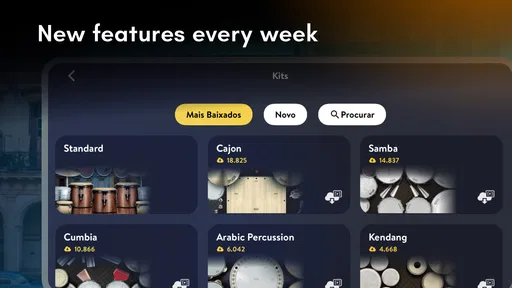
The range of drum kits lets me try different sonic character without changing instruments. Switching kits is especially useful when I have a rhythm in mind but am unsure what kind of feel suits it. I can repeat the same basic pattern with another kit and listen for how the tone changes the mood. This is a better use of the variety than treating each kit as a completely different instrument to master.
Worth Reading Before You Choose

EA SPORTS FC Mobile 26 Is a Bigger Football Game, but It Takes Time

Flipboard Shows What News Apps Must Do Beyond the Feed

Switching to Android Auto Means Rethinking Your Driving Routine

Google Calendar Makes a Crowded Week Easier to Manage

Ludo King Makes the Most of the Minutes Between Plans

Baby Panda World Brings Quick Play to Modern Phones, but Its Game Library Feels Busy
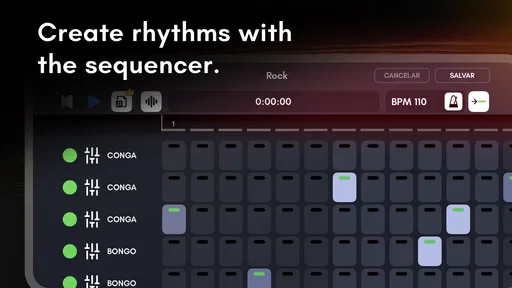
Recording is another practical tool. When I stumble on a groove worth keeping, capturing it lets me listen again rather than relying on memory. I would use recordings as rough sketches: a way to check whether a fill lands naturally or whether a rhythm stays steady from beginning to end. A phone recording is not the same thing as a polished music-production session, but it can still help me notice what I was actually playing.
For a realistic everyday use, imagine having a few minutes free while waiting for a friend. I can open the app, work through a lesson or tap a simple groove, record a variation, then replay it before moving on. That is a more realistic promise than expecting a short mobile session to turn me into a stage-ready drummer. It is also where the app makes sense: low-commitment access to percussion whenever a full instrument is unavailable.
Where it sits among music apps
Compared with a metronome, this game gives me more to interact with: I can play different drum sounds and build a pattern rather than only follow a timing reference. Compared with a full digital audio workstation, it is much less involved and is easier to approach when I just want to tap out an idea. Those alternatives are better for their own jobs. A metronome is the clearer choice when timing practice is the only goal, while a production app makes more sense when I need to arrange, edit, and develop a complete track.
Compared with a real practice pad or electronic kit, the screen is convenient but less physically informative. It can help me think about the order of hits and the shape of a groove, but it cannot reproduce the feel of striking a surface or coordinating a foot pedal. I would recommend it to curious beginners, casual music-makers, and drummers who want a lightweight idea-catcher. I would steer someone seeking realistic stick technique or serious rehearsal toward a physical instrument instead.
What to know before settling into a routine
The screen layout is part of the trade-off. A larger display generally gives my hands more room to reach separate kit pieces, whereas a compact phone can make fast or wide patterns awkward. Before judging my coordination, I would try a slower rhythm and check whether my fingers can reach the intended areas comfortably. This helps distinguish a pattern that needs practice from one that is simply cramped on the device.
Responsiveness also depends on the device and what else is running. If taps seem delayed, closing background apps and trying again is a sensible first step; a sluggish response can throw off timing even when the rhythm itself is simple. I would not rely on a touch screen for precision-critical performance, but for casual exploration and basic patterns it can be perfectly enjoyable when the device responds well.
The game is free to download, with optional in-app purchases priced from $1.99 to $18.99 per item. I would start with the free experience and decide whether I actually want more after trying the kits and lessons available to me. That avoids paying simply because an extra option is visible. The game is rated Everyone, and it supports Android 7.0 and later, making its platform requirements straightforward for compatible Android devices.
Getting Started with Real Percussion
So, what’s the first thing you do when you download a new app? Open it up and start tapping around, right? With Real Percussion: drum set, it was no different. From the get-go, you’re greeted with a user-friendly interface that’s perfect for both beginners and seasoned drummers alike. It’s like the app is saying, “Hey, let’s make some noise!”
The app is designed to simulate a real drum set, and it does this pretty convincingly. You’ve got your bass drum, snare, toms, cymbals, and more—all laid out neatly on your screen. The graphics are crisp, and each piece of the drum set is easily accessible, making it a breeze to start jamming right away.
Features That Hit the Right Note
Now, let’s dig into the features. One thing that really stands out is the variety of drum kits available. Whether you’re into rock, jazz, or electronic beats, there’s a kit that suits your style. You can switch between kits with just a tap, allowing you to experiment with different sounds and rhythms.
Another cool feature is the ability to record your sessions. Imagine creating a killer drum solo and being able to play it back or share it with your friends. The app makes it simple to capture your creativity, ensuring your beats don’t just fade into oblivion.
For those who might need a little guidance, the app offers some tutorials and lessons. It’s like having a drum teacher on standby, ready to help you master the basics or refine your technique. This is particularly handy if you’re just starting out or want to learn some new tricks.
Getting into the Groove
Using the app is a blast, literally. The response time is impressive, with each tap on your screen producing a sound that’s almost instantaneous. It’s pretty amazing how accurately the app replicates the feel of a real drum set, from the subtle tap of a hi-hat to the deep thud of a bass drum.
The sound quality is top-notch, which is crucial for any music app. You don’t want your beats to sound like they’re coming out of a tin can, right? It delivers rich, authentic sounds that make the experience all the more enjoyable.
Some Things to Keep in Mind
While the app is a fantastic tool for drumming enthusiasts, there are a couple of things to be aware of. Depending on your device, you might experience some lag if there are too many apps running in the background. It’s a good idea to clear up some memory to ensure smooth play.
Also, the app is free to download, but there are in-app purchases for additional features and drum kits. If you’re serious about expanding your drumming repertoire, you might want to consider investing in some of these extras.
The Final Beat
Overall, the game is a fantastic app for anyone looking to explore the world of drumming without breaking the bank—or their neighbors’ patience. It’s fun, intuitive, and packed with features that cater to drummers of all levels. Whether you’re looking to practice your skills or just want to have some fun making music, it’s definitely worth a download.
So, why not give it a shot? You might just find that you’re a natural-born drummer waiting to be discovered. And who knows, maybe someday you’ll be rocking out on a real stage, all thanks to the start you got with Real Percussion: drum set.
Who will get the most from it
I see this as a good fit for someone who is curious about percussion but not ready to buy an instrument, or for a player who wants to sketch a beat while away from a kit. It is also a friendly option for sharing basic rhythm exploration with a child, especially since its age rating is Everyone. For a learner, the strongest routine is short and focused: choose one lesson, repeat its pattern, and then try it freely before moving on. That gives the taps a purpose instead of turning every session into aimless noise.
It is less suitable for people who need a quiet practice tool, detailed notation, or a complete recording environment. Tapping still creates audible sound, and the experience is built around playing percussion rather than managing an entire musical project. If my main goal were to compose layered songs, train stick grip, or rehearse with the dynamics of a real kit, I would choose a tool designed for that job. Here, the best expectation is accessible rhythm-making with a useful learning component.
What I would watch as a returning user
The version number confirms that the app has continued through many iterations, but a version number alone does not tell me which particular features changed or how those changes affect an existing setup. I would judge an update by practical things I can notice: whether the familiar controls remain easy to reach, whether saved recordings still serve my workflow, and whether the sound remains responsive on my device. Those are the details that matter more to a regular player than a long list of changes.
For someone returning after a break, I would first revisit a familiar lesson and replay an old rhythm before changing kits or buying extras. That gives a useful baseline for deciding whether the current experience suits the way you play now. If you are new, start with the free version, explore the lessons, and see whether the screen layout works for your hands. My overall view is that this is a convenient, approachable percussion game with real value for spontaneous practice and experimentation, as long as you keep its touch-screen limits in perspective.
Pros
- Intuitive interface for easy use.
- High-quality sound samples.
- Customizable drum kits.
- Variety of percussion instruments.
- Useful for both beginners and pros.
Cons
- Ads can be frequent.
- Limited free features.
- In-app purchases required for full access.
- Requires stable internet for updates.
- Takes up considerable storage space.
FAQs for Real Percussion: drum set
What features does Real Percussion: drum set offer?
Real Percussion: drum set provides a comprehensive drumming experience with a variety of drum kits and percussion instruments. It includes high-quality audio samples, customizable layouts, and a user-friendly interface. Users can also access a library of loops and tracks to play along with, making it suitable for both beginners and experienced drummers.
Is Real Percussion suitable for beginners?
Yes, Real Percussion is designed to be user-friendly and is suitable for beginners. The app offers tutorial modes and guided lessons to help new users learn basic drumming techniques and rhythms. With its intuitive interface, even those with no prior drumming experience can start playing easily.
Does Real Percussion require an internet connection to use?
Real Percussion can be used offline, allowing users to play and practice without an internet connection. However, certain features, such as downloading additional loops or accessing online tutorials, may require an internet connection. It's best to download any needed resources before going offline.
Are there in-app purchases in Real Percussion?
Yes, Real Percussion includes in-app purchases. While the basic version of the app is free, users can purchase additional drum kits, loops, and premium features. This allows users to expand their drumming experience and access more advanced tools and sounds tailored to their preferences.
Can I record and share my performances with Real Percussion?
Absolutely! Real Percussion allows users to record their drumming sessions directly within the app. Users can then save and share their performances through various platforms, making it easy to showcase skills or collaborate with others. The app supports multiple audio formats for convenient sharing.


